Team Training

Coach-Rated Training, Session by Session

Schedule a session, pick its focus, and rate every player from 0 to 10 across technical, tactical, physical and team attributes — right from the sideline. Players RSVP so you always know who's showing up, and every session adds to their record for the season.
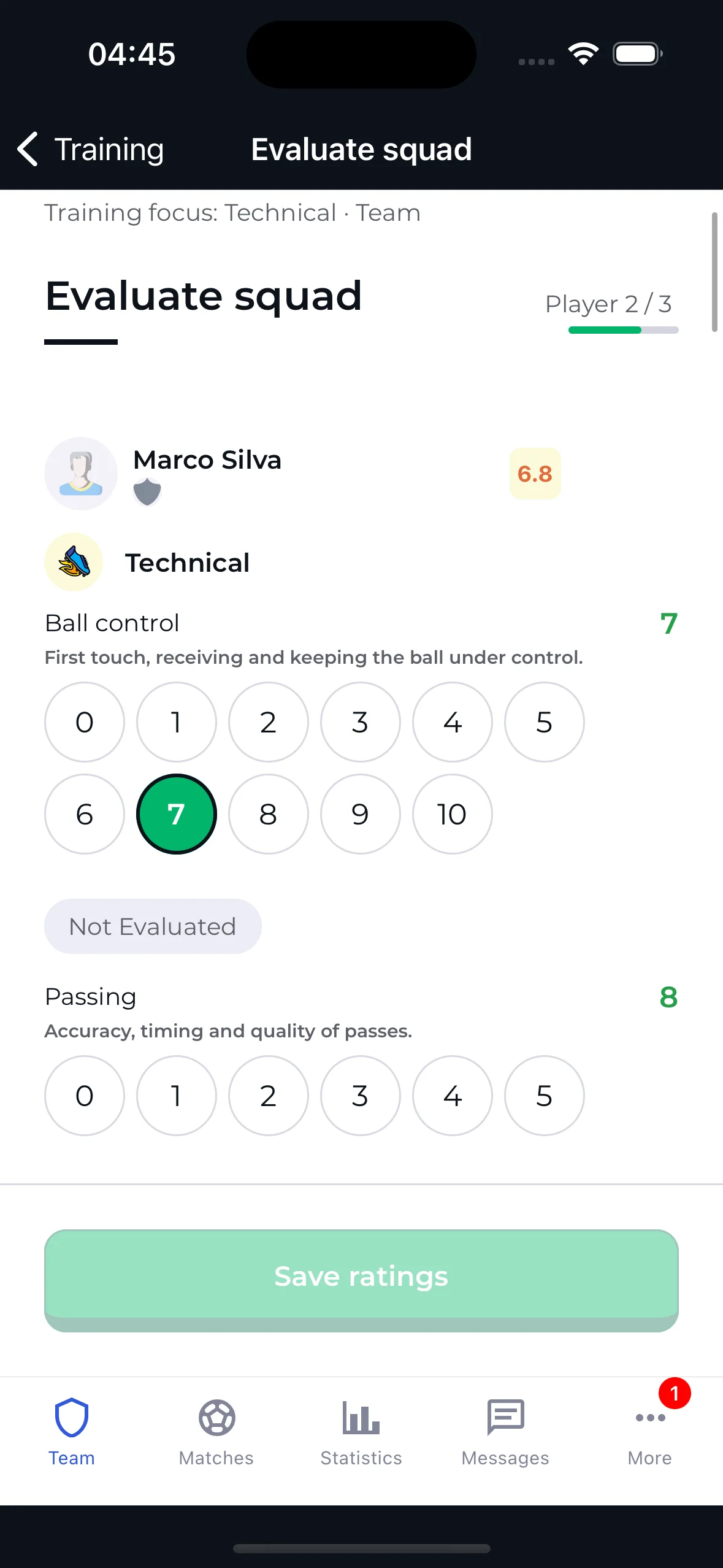
Coach rating a player's technical attributes after a training session

Training, The Way Grassroots Coaches Actually Run It

Coach-Rated, Not Hardware-Measured

No GPS vests or wearables required. You rate what you see — ball control, positioning, work rate — on a simple 0–10 scale, right after the session.

RSVP Built Into Every Session

Players confirm or decline before you even show up. You always know who's coming, who's out, and who hasn't answered yet.

A Record That Builds All Season

Every rated session adds to a player's history — a running, session-by-session record you and the player can look back on.

Four Categories, Fourteen Attributes, One 0–10 Scale

Pick the categories that matter for today's session. FREE teams rate up to 2 per session — PRO teams rate all four.

Technical

  • Ball control
  • Passing
  • Dribbling
  • Shooting

Tactical

  • Positioning
  • Decision making
  • Defending

Physical

  • Work rate
  • Speed & agility
  • Strength

Team

  • Teamwork
  • Communication
  • Discipline
  • Leadership

Every attribute is rated 0–10 by the coach after the session — no sensors, no self-reporting. Goalkeepers get their own set: shot stopping, handling, distribution, aerial command, one-on-ones, sweeping and reflexes.

Know Who's Coming Before You Show Up

Every training session sends players a confirmation request. They confirm or decline right from the app, and you see the roster split into Confirmed, Declined and Pending — no guessing, no last-minute headcounts.

  • Players confirm or decline with one tap
  • Roster grouped into Confirmed, Declined and Pending
  • A confirmation deadline set per session
  • Only confirmed players appear in the evaluation queue
Player confirming attendance for an upcoming training session

Schedule a Session, Pick Its Focus, Done

Set the date, time, duration and location, then choose which categories today's session will cover. FREE teams get 4 sessions a month with up to 2 categories each; PRO removes both limits.

  • Date, time, duration and location in one form
  • Choose 1 to 4 focus categories per session
  • 4 free sessions a month, unlimited with PRO
  • Edit or cancel a session any time before it's evaluated
Creating a training session — focus categories, date and time

Players See Their Own Ratings, Not Just The Coach

Nobody is rated in the dark. Every player opens their own profile to the same numbers the coach entered — a score out of 10 for each category, a plain-language label next to it, and an arrow showing whether they've climbed or slipped since the last sessions.

  • A live score for Technical, Tactical, Physical and Team
  • Plain-language labels — from Very poor up to Exceptional
  • Trend arrows showing movement since previous sessions
  • The player sees it in their own profile, no request needed
Player profile showing the four category scores and a progress chart

A Season-Long Curve, Not A One-Off Score

Every rated session becomes a point on the player's progress graph. Switch between the overall curve and each individual category to see exactly where a player is improving — and where the work still is.

  • Session-by-session line chart on the same 0–10 scale
  • Tabs for Overall, Technical, Tactical, Physical and Team
  • Every point traces back to one real, dated session
  • Coach and player read the exact same graph
A Season-Long Curve, Not A One-Off Score

Training Ratings Build The Player's Card

The coach's ratings from the last 6 training evaluations roll up into the player's team card — pace, shooting, passing, dribbling, defense and physical — with a radar chart that shows the shape of the player at a glance.

  • Team rating calculated from the last 6 evaluations
  • Six card attributes derived from the rated categories
  • Radar chart showing strengths and gaps at a glance
  • The card updates itself as new sessions get rated
Player card with team rating, attribute bars and a radar chart

Every Session You've Run, Kept On Record

Upcoming and past sessions live side by side. Each entry keeps the date, the focus categories it covered and how many players confirmed — so a season's work is one scroll away instead of scattered across group chats.

  • Upcoming and History in one place
  • Focus categories tagged on every session
  • Attendance count kept per session
  • Open any past session to see who was rated and how
Training history list with focus category tags and attendance counts

Start Rating Your Team's Training

Team Training is free to start — 4 sessions a month, up to 2 categories each. Upgrade to PRO for unlimited sessions and all four categories every time.

Scan QR code to download 4league

Scan to download