One Calendar For Every Pitch, Zero Double-Bookings
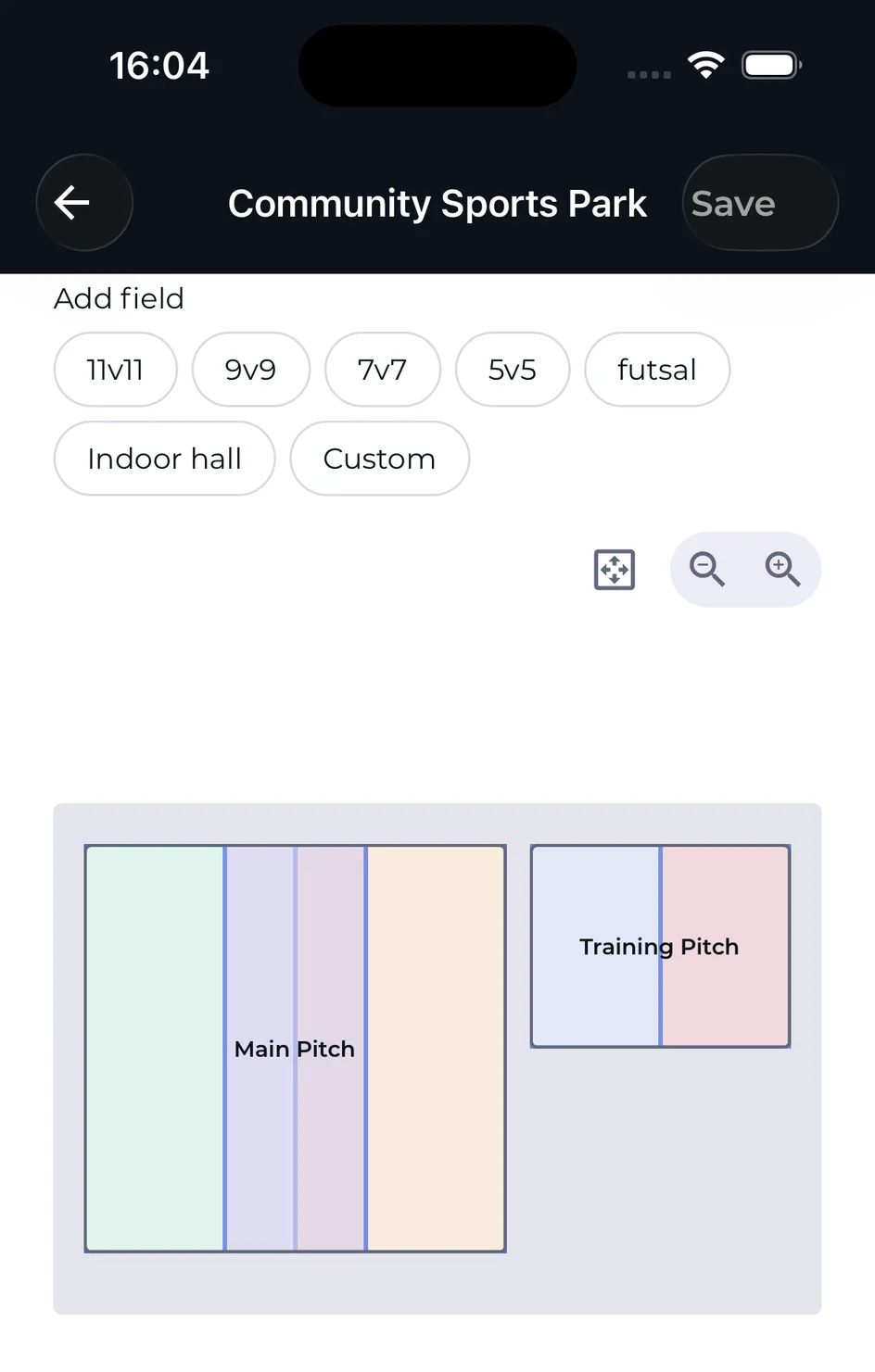
Arrange each pitch on your venue's map, split it into preset halves or thirds, and every booking against it — training, matches, team reservations, client appointments — lands on one shared calendar with real-time conflict detection.
Facilities Scheduling, The Way Venues Actually Run
Real-Time Conflict Detection
Every booking is checked against the facility, the zone and a configurable changeover buffer — so two teams are never sent to the same strip of grass at the same time.
Calendar Access You Control
Set each venue's calendar to Private, Teams or Members. Anyone outside that level sees a booking only as "Reserved" — no client name, no team, no notes.
One Flow From Training To The Calendar
Coaches pick the venue, facility and zone right from the training form, and the booking appears on the shared calendar instantly — no separate scheduling tool.
Facility Calendar
Every Pitch, Every Booking, One Day View
See every facility side by side for the day, color-coded by type, so you know what's happening across the whole venue at a glance — and get warned the moment two bookings overlap.
Color-coded by booking type: training, match, team reservation, client booking, event and maintenance
An overlapping booking is flagged as a scheduling conflict, showing exactly what it overlaps with
Jump straight to available pitches — other zones at the same time, or other facilities free at the same hour
Filter by venue, facility, zone, team, coach or booking type
Scheduling conflictAcademy Extra Session overlaps with Community 5-a-Side Cup, 17:30–18:00 · Indoor Hall Half 2
Training → Facility → Calendar
Coaches Book The Pitch Without Leaving The Training Form
Scheduling a training session already asks for the venue, the facility and — when the pitch is split into zones — which zone. Save it, and the session appears on the organization's shared facility calendar automatically.
Venue and facility picker built into the training form
Pick a zone when the pitch is split — full pitch, halves or thirds
See the pitch location, with an optional map, before you save
No separate booking step — the training session is the booking
Privacy By Default
3 Calendar Access Settings — Private, Teams, Members
Every venue has exactly one calendar access setting. Anyone below that level sees a booked slot only as "Reserved" — no client name, no team, no notes.
Private — only administrators and facility managers see the calendar
Teams — managers of connected teams see their own team's bookings
Members — organization members see the booked time slots
Recurring Bookings
Set Up A Weekly Series Once, Adjust One Session Without Breaking It
Repeat a booking weekly, every two weeks, or on a custom pattern, then edit or cancel just one occurrence, this session and every one after it, or the entire series — past sessions are never touched.
Weekly, biweekly or custom recurrence, with an end date or left open-ended
Edit only this booking, this and future bookings, or the entire series
Past sessions in a series are never affected by a later edit
Sessions that fall inside a closure are automatically skipped, not silently double-booked
Exceptions & Closures
Block A Pitch For Maintenance Without Cancelling Every Booking By Hand
Close a whole venue or a single facility for a date range — pitch resurfacing, a private event, winter maintenance — and any existing booking that overlaps is flagged so you can deal with it deliberately, not cancelled for you.
Close an entire venue or a single facility
Set a reason so managers and coaches know why it's closed
Overlapping bookings are flagged, never silently cancelled
New bookings can't land inside a closed date range
Client Bookings
Rent Out A Pitch To Paying Clients, Not Just Your Own Teams
Turn on client bookings for a facility and take appointments from people outside your organization — track who booked, what they owe, and whether they've paid, right alongside your teams' training and matches.
New appointment with client name, phone, email and price
Mark an appointment paid or unpaid, and revisit it any time
Weekly and monthly revenue totals, including what's still unpaid
Filter appointments by upcoming, past, paid or unpaid
Today At A Glance
Walk In And See What's Open, What's Booked, What's Next
The facilities overview shows every venue's pitches for today — open or closed, free now or booked until when — plus today's full booking list and quick actions, without digging through the calendar.
Open/closed status and "free now" for every facility, per venue
Today's bookings listed in order, with type and time
Quick actions to add a booking or a closure without leaving the screen
Grouped by venue, so a multi-venue organization stays readable
Opening Hours
Set When Each Venue Is Actually Open, Down To The Day
Give a venue its own weekly schedule — on or off per day, with one or more time ranges each, like a morning slot and an evening slot with a midday gap — so nothing can be booked when the venue is closed.
Per-day hours with multiple time ranges, like morning and evening
Override hours for a single pitch on the PRO plan
Full-access staff can confirm and book outside hours; others can't
Closures always take priority over opening hours
Running an organization with multiple venues? See the full organizations feature set. Coaches booking training sessions can pick the pitch straight from the team training scheduling form. Want the full walkthrough? Read the Facilities & Scheduling wiki guide.
FAQ
Facilities & Scheduling, Answered
Does 4league prevent two teams from booking the same pitch at the same time?
Yes. Every booking is checked against the facility, the zone and a configurable changeover buffer between bookings. An overlapping booking is flagged as a scheduling conflict before it's saved, and you can jump straight to available pitches instead.
Who can see our facility bookings?
You choose. Each venue's calendar access is set to Private (admins and facility managers only), Teams (connected teams see their own bookings) or Members (organization members see the booked time slots). Anyone outside that level sees the slot only as "Reserved", with no details.
Can I set up a weekly training slot without re-booking it every week?
Yes. Set a booking to repeat weekly, every two weeks, or on a custom pattern, with an end date or left open. You can later edit or cancel just one session, that session and every one after it, or the whole series.
How do I block a pitch for maintenance without cancelling every session on it by hand?
Add a closure for the venue or a single facility over a date range, with a reason. Any existing booking that overlaps is flagged for you to review — it's never cancelled automatically.
Can we take bookings from clients outside our own teams?
Yes. Turn on client bookings for a facility and take appointments from anyone — track the client's details, the price, and whether they've paid, alongside your teams' training and matches on the same calendar.
Set Up Your Venue, Free
4league's facilities module is free to start — one venue, the shared calendar, conflict detection and calendar-access privacy included. Upgrade to PRO for more venues and split pitches into zones.
We use cookies to analyze site traffic and improve your experience. By accepting, you allow analytics cookies. You can change your choice anytime.
Privacy Policy